12 board designs
GHL pipeline board design for every loan stage
On a stock board, Underwriting looks exactly like Clear to close. GHL pipeline board design colours each stage by its position, styles the deal cards and makes the loan amount stand out, without changing a single deal or stage.
Application9
Processing6
Underwriting4
Clear to close3
Funded11
Illustration with sample names. Included from Rate Lock
The real GoHighLevel opportunities board, restyled
Pick one of 12 designs and the sample board restyles: stage headers, column backgrounds, deal cards, values and the toolbar. Our default is Obsidian Gold, black and gold, which reads well on a wall screen. Scroll the board sideways to see every stage.
Loading the live preview
Obsidian Gold. A copy of the GoHighLevel opportunities board with a sample pipeline, restyled by the real engine. Stage colours follow column position, so your own loan stages pick them up.
GHL pipeline colors by position, not by name
The first stage gets the first colour, the second the next, and they repeat after the last one. A refinance pipeline, a purchase pipeline and a realtor-referral pipeline all pick up the design without any setup per pipeline.
- Headers as cards, plain, tinted, filled or underlined, with a colour dot
- Deal counts as text or a badge; columns soft, tinted, glass or outlined
- Cards with the stage colour as a stripe or a dot, in three densities
- Cards never move on hover, so dragging a file stays precise
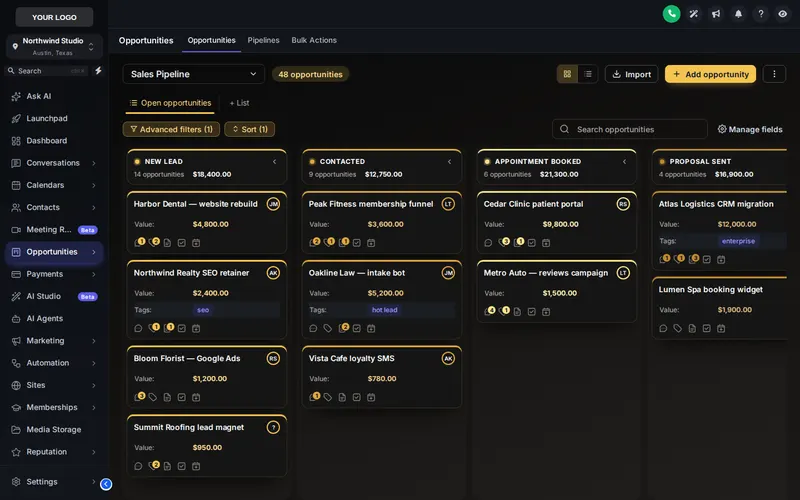
12 GHL kanban designs, 2 of them dark
See the bottleneck at a glance
When Underwriting is a different colour from Processing, a column that is three times longer than the rest jumps out before the morning stand-up.
The loan amount, bold
The deal value can sit in bold in the stage colour, so a jumbo file does not hide among the conventional ones.
Compact cards
When a rate drop fills the refinance pipeline, switch to the compact density and see more files per column.
- 1 minute
1. Pick a board design
Open the Pipeline tab and choose one of 12 designs. The preview shows it on a sample pipeline.
- 5 minutes
2. Tune the colours and density
Set the stage palette (or build it from your brand colour), card density, value colour and the toolbar style.
- Instant
3. Save
Every opportunities board on your install line, in every pipeline, picks up the design on the next page load.
Restyle the loan pipeline in three steps
The list view and the toolbar above the board (pipeline picker, filters, search and buttons) follow the board design automatically.
GHL pipeline board questions
GHL Customizer is an independent product sold by Mortgage Snapshot. It is not affiliated with, endorsed by or sponsored by HighLevel Inc.; GoHighLevel and HighLevel are trademarks of their owner. Previews on this page run on copies of GoHighLevel screens with sample data. Mortgage Snapshot is not a lender and nothing here is lending advice.
It restyles the GoHighLevel opportunities board: stage headers, column backgrounds, deal cards, value styling, the toolbar above the board and the list view. Your pipelines, stages and deals are not changed.
12, from clean light boards to 2 dark ones such as Obsidian Gold. Each can be tuned with your own colours.
Yes. Stage colours are assigned by column position, not by stage name, so a board with Application, Processing, Underwriting, Clear to close and Funded picks up the design the same way as any other pipeline.
Yes. Cards never move on hover, so dragging a file from Processing to Underwriting is as precise as in stock GoHighLevel.
Yes. The deal value can be bold and in the stage colour, and you can set your own colours for deal names, field labels and values.
Deal cards come in three densities, from compact to spacious, so a busy refinance pipeline can show more files per column.
Yes. The list view and the toolbar (pipeline picker, filters, search and buttons) are restyled to match the board design.
It comes with Rate Lock ($577) and Closing Day ($1,147). All 12 designs are included.
Usually within minutes. Your GHL Customizer account is created automatically after Stripe confirms the payment, and the login (your email plus a temporary password) is emailed to you. The latest it can take is 24 hours, which only happens if the automatic setup fails and the team creates the account by hand.
Move files faster: contact buttons, dashboard, menu
A loan pipeline you can read from across the room.
All 12 board designs come with Rate Lock and Closing Day. Pay once and the login arrives in minutes.
Secure Stripe checkout Login emailed within minutes (max 24 hours)