
Menus and navigation
GHL sidebar menu customization: 17 items in, 6 out
A processor needs the loan pipeline, the inbox and the calendar, not memberships and app marketplaces. GHL sidebar menu customization lets you rename, reorder and hide menu items, move the menu to a top bar, open sub-pages in mega menus and add a floating quick menu.
Included from Rate Lock
Sidebar, right dock or GHL top bar menu
The menu can sit in a left sidebar, a right dock or a top bar in 8 styles, and sub-pages open as a list or a GoHighLevel mega menu in 8 styles. A merged header puts the top bar and header on one row.
Every part of the GoHighLevel navigation
Rename, reorder, hide
Call Opportunities “Loan pipeline” and Contacts “Borrowers”. Drag items into the order your team works, group them under headings and hide the rest.
Your own links
Pricing engine, document portal, LOS, training videos: in the app or a new tab.
8 mega menu styles
Columns, tiles, tabs, an icon rail or a full-width band for sections with sub-pages.
8 header styles
Pick a header and hide the header buttons you do not want clients to press.
Start page
Send each sub-account to the right first screen, such as Opportunities.
Announcements and self-service
The same package adds announcements for your team or clients, and sub-account self-service styling.
Not a permission
Hiding is cosmetic. Use GoHighLevel’s user roles to restrict access.
A GoHighLevel floating menu for the screens you open fifty times a day
A bubble with a grid, a dock bar or a side rail, in 8 designs. Everyone can drag it where they like; it remembers the spot. Ours is labelled “Loan desk”.
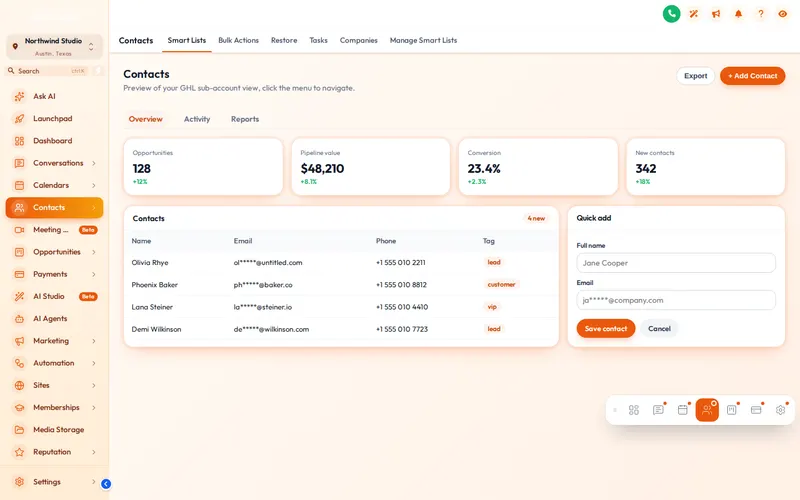
How to hide GHL menu items by role
One install line serves one menu design; use workspaces when two groups need genuinely different menus. These are the setups we see most in mortgage shops.
| Who | Keep in the menu | Layout we would pick |
|---|---|---|
| Loan officer | Inbox, Borrowers, Loan pipeline, Appointments, Reviews | Left sidebar plus a floating quick menu |
| Processor or LOA | Loan pipeline, Borrowers, Tasks, Inbox | Top bar, merged header, start page set to the pipeline |
| Branch manager | Dashboard, Production report, Loan pipeline, Workflows | Left sidebar with mega menus for Reporting and Sites |
| Agency client | Whatever you sell them, renamed in their words | Their own workspace and theme, links to your help centre |
Customize the menu in three steps
The menu engine reads GoHighLevel’s own menu and restyles it, so new GoHighLevel items still appear when HighLevel adds them.
- 5 minutes
1. Arrange the menu
Drag items into order, rename them, pick icons, hide what your loan team does not use and add your own links.
- 2 minutes
2. Pick a layout
Left sidebar, right dock or a top bar in 8 styles, a sub-menu style (8 mega menu styles), a header style and, if you want it, a floating quick menu.
- Instant
3. Save
Agency and sub-account views update on their next page load. Change it again whenever the team’s habits change.
GoHighLevel menu questions
GHL Customizer is an independent product sold by Mortgage Snapshot. It is not affiliated with, endorsed by or sponsored by HighLevel Inc.; GoHighLevel and HighLevel are trademarks of their owner. Previews on this page run on copies of GoHighLevel screens with sample data. Mortgage Snapshot is not a lender and nothing here is lending advice.
You can rename items, reorder them, change icons, hide what your team does not use, group items under headings and add your own links, for example to a pricing engine, a document portal or your realtor co-marketing page.
Yes. Keep the sidebar on the left, dock it on the right, or turn it into a top bar in 8 styles. A merged header puts the top bar and the header on one row to save space.
Sections such as Payments or Sites have sub-pages. Instead of a plain list, a mega menu opens them as columns, tiles, tabs, an icon rail or a full-width band, in 8 styles.
A small menu that floats over every page with the screens people use most, as a bubble with a grid, a dock bar or a side rail, in 8 designs. Anyone can drag it to where they like and it remembers the spot.
No. Hiding removes the item from the menu only. To restrict access, use GoHighLevel’s own user permissions, and privacy mode if you share screens.
Yes. You can set the start page after sign-in, for example Opportunities for a processor who lives in the loan pipeline, and pick a header style or hide header buttons you do not want people to press.
The menu engine reads GoHighLevel’s own menu and restyles it, so new GoHighLevel items still appear. If HighLevel changes its markup, the customizer is updated centrally and your design keeps working without a reinstall.
It comes with Rate Lock ($577) and Closing Day ($1,147). That covers mega menus, the floating quick menu, announcements and sub-account self-service styling.
Usually within minutes. Your GHL Customizer account is created automatically after Stripe confirms the payment, and the login (your email plus a temporary password) is emailed to you. The latest it can take is 24 hours, which only happens if the automatic setup fails and the team creates the account by hand.
The rest of the working day: dashboard, pipeline, contact buttons
A menu that matches how loans move.
Menus, mega menus and the floating quick menu come with Rate Lock and above, along with dashboards, pipeline boards and the contact actions bar.
Secure Stripe checkout Login emailed within minutes (max 24 hours)