18 dashboard templates
GoHighLevel dashboard design for the Monday pipeline meeting
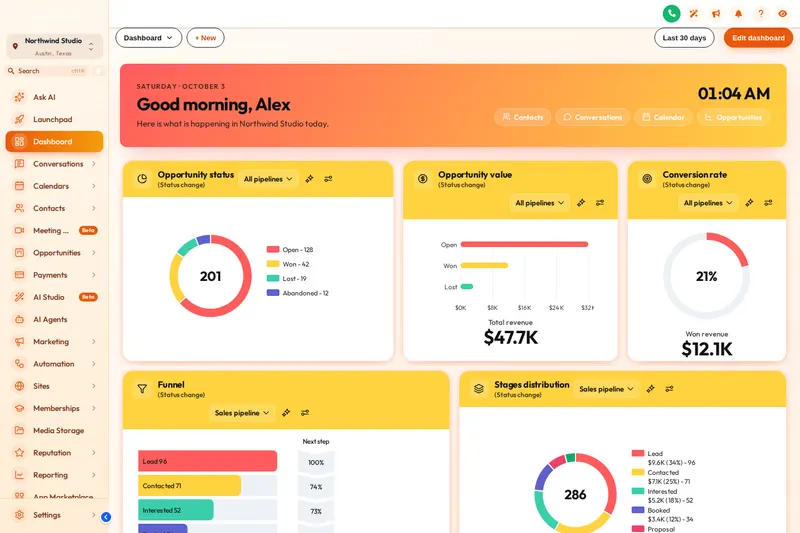
Every branch opens the same grey dashboard. GoHighLevel dashboard design gives it a welcome banner with each person’s name and a live clock, photo or particle backgrounds, styled widget cards and chart colours from your brand. The numbers underneath stay exactly as they are.
Included from Rate Lock
Dashboard designs at a glance
- Light designs
- 9Aurora Glass, Clean Bento, Sunset Warm, Ocean Pro, Emerald Finance, Candy Pastel, Brand Match, Slate Minimal, Neo Brutal
- Dark designs
- 3Midnight Neon, Obsidian Gold, Cyber Grid
- Photo designs
- 6Northern Lights, Pastel Sky, City Nights, Lagoon, Golden Hour, Liquid 3D
- Data changed
- NoneYour widgets, reports and numbers stay as they are
Try every GHL dashboard template
A custom GHL dashboard changes the banner, background, cards, numbers and chart colours of the sub-account dashboard. Pick light, dark or photo, then a design: the sample dashboard restyles instantly.
Loading the live preview
Neo Brutal. Each chip is a real dashboard template applied by the engine to a copy of the GoHighLevel dashboard. The greeting and the clock are live.
What GHL dashboard customization actually touches
Welcome banner
First name, sub-account name, the date and a live clock, with quick links. Gradient, photo, glass or minimal, and your own title and subtitle.
Chart colours by position
First colour for the first stage, second for the next. It fits any pipeline, whatever your stages are called.
Widget cards
Background, border, radius, shadow, hover, frosted glass, an accent stripe and headers as plain, a divider or a colour band.
Particles
Dots, a network, bubbles or stars behind the widgets or in the banner. Light, and they stop when you leave the page.
Numbers and titles
Big numbers in a colour or gradient, title size and weight, a dashboard font and a matching icon beside each title.
Light and dark
Dark designs use light text on dark cards, with a top bar and filter drop-downs styled to match.
A mortgage CRM dashboard people actually open
The branch screen on the wall
Put the dashboard on the office TV for the Monday pipeline meeting. A dark design with large numbers reads from across the room, and stage colours that follow your pipeline make Application, Processing and Funded easy to tell apart.
A banner that sets the day’s priority
The welcome banner greets each loan officer by first name. Use the subtitle for this week’s focus, such as clearing rate-lock expirations before Friday or calling every pre-approval older than 30 days.
Agency clients who log in to check results
If you run GoHighLevel for brokerages, the dashboard is what your client sees when they check whether the leads are coming. A designed one looks like a product they pay for, not a default screen.
Publish a dashboard design in three steps
Dashboard designs ride on the install line you already added for the theme; there is nothing extra to paste.
- 1 minute
1. Pick a design
Open the Dashboard tab, switch the restyle on and click one of 18 templates.
- 10 minutes
2. Write the banner and set the colours
Greeting, title and subtitle, a photo if the design uses one, particles on or off, and chart colours built from your brand colour.
- Instant
3. Save
Every sub-account dashboard on your install line picks up the design on its next page load.
GoHighLevel dashboard questions
GHL Customizer is an independent product sold by Mortgage Snapshot. It is not affiliated with, endorsed by or sponsored by HighLevel Inc.; GoHighLevel and HighLevel are trademarks of their owner. Previews on this page run on copies of GoHighLevel screens with sample data. Mortgage Snapshot is not a lender and nothing here is lending advice.
It restyles the GoHighLevel sub-account dashboard: a welcome banner with the user’s first name, the date and a live clock, the background, widget cards, big numbers, titles, icons and chart colours. Your widgets and their data stay exactly as they are.
18. 5 are dark and 6 are built around a photo, such as northern lights, a city at night or a lagoon. Every design is a starting point you can change.
Charts take colours by position: the first colour for the first stage or status, the second for the next, and so on. That means they fit any pipeline, whether your stages are called Application and Processing or Lead and Booked call.
Yes. Photo designs let you swap in your own image and set how much shade sits over it, so the numbers stay readable.
They are light, and they stop when the page is left. You can switch them off or use them only inside the banner.
Everything on one install line shares the design. Use separate workspaces if different branches or clients need different dashboards.
Yes. The banner can greet people by first name and show the sub-account name, and you write the title and subtitle, for example a reminder to clear today’s rate-lock expirations first.
It comes with Rate Lock ($577) and Closing Day ($1,147). All 18 designs are included.
Usually within minutes. Your GHL Customizer account is created automatically after Stripe confirms the payment, and the login (your email plus a temporary password) is emailed to you. The latest it can take is 24 hours, which only happens if the automatic setup fails and the team creates the account by hand.
Dashboards pair with the pipeline board and the theme
Make Monday’s numbers worth looking at.
All 18 dashboard designs come with Rate Lock, together with menus, pipeline boards and the contact actions bar.
Secure Stripe checkout Login emailed within minutes (max 24 hours)