Contact actions bar
GHL contact quick actions: one tap, file moves
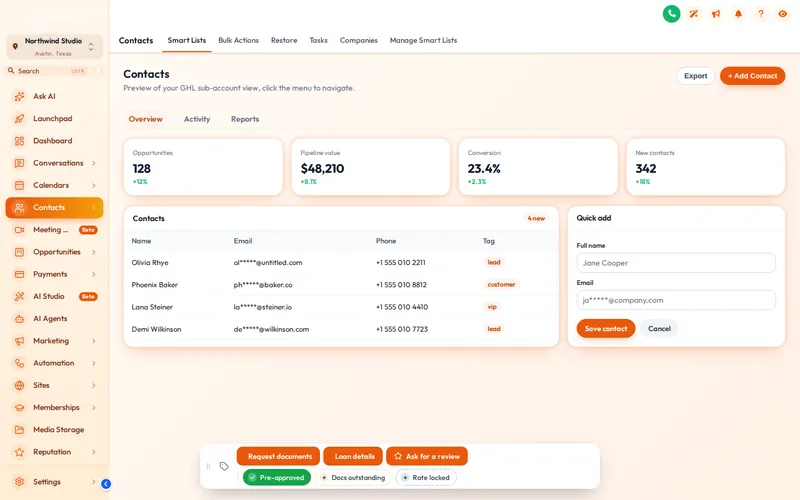
Tagging a borrower to start a workflow takes six clicks in stock GoHighLevel. GHL contact quick actions put chips and buttons on every contact page: tap Pre-approved and the workflow starts; tap Loan details and a short form fills the custom fields.
Included from Rate Lock
- Program
- FHA 30-yr
- Loan amount
- $318,500
- Stage
- Processing
- Lock expires
- Not locked
Tag “Pre-approved” is on this record.
What are GoHighLevel contact buttons?
The contact actions bar is a small, draggable bar on every GoHighLevel contact page. Quick tags add or remove a tag in one tap, which can start the workflow listening for it. Buttons can add, remove or toggle tags, or open a short form that writes straight into custom fields.
GHL quick tags on a borrower record
This is the real bar on a sample contact page, set up for a loan team: Pre-approved, Docs outstanding and Rate locked chips, a Request documents button and a Loan details form. Drag it by the grip; switch colours and positions with the chips.
Loading the live preview
A colour per tag. This is the real contact actions bar. Tap a quick tag, open Loan details to see its form, or drag the bar by its grip. Nothing is saved in the preview; inside GoHighLevel the contact updates at once.
Mortgage CRM shortcuts worth building first
The bar does not run workflows itself; it adds the tag or fills the field your existing GoHighLevel workflows already react to. These four cover most of a loan officer’s day.
Pre-approved
Starts the workflow that emails the pre-approval checklist and notifies the realtor partner on file.
Docs outstanding
Starts a polite reminder sequence by SMS and email until the tag is removed.
Rate locked
Opens the Loan details form, saves the lock expiry date and starts the expiry reminder workflow.
Ask for a review
Toggles on after funding and starts the review request; tap again to remove it.
A GHL custom field form in one tap
- Field types: text, paragraph, number, date, drop-down, email, phone and link
- Your own messages when a tag is added or removed, and per button
- Optional note on the contact: which tag changed, or which field went from what to what, and by whom
- 6 starting positions; people drag it and it remembers the spot
- Show each chip or button in every sub-account or only the ones you list
- The page updates at once; if GoHighLevel refuses a change, the chip flips back and says why
Set up the bar in three steps
Build the workflows in GoHighLevel first (or use the ones that came with the Mortgage Snapshot), then point the buttons at their tags.
- 10 minutes
1. Add chips and buttons
In the Contact actions tab, add the quick tags and buttons your loan team needs, with colours, icons and messages.
- 5 minutes
2. Connect your workflows
Point each button at the tag a GoHighLevel workflow listens for, or at the custom fields a short form should fill in.
- Instant
3. Save
The bar appears on every contact page, in the sub-accounts you chose, on the next page load.
Contact actions bar questions
GHL Customizer is an independent product sold by Mortgage Snapshot. It is not affiliated with, endorsed by or sponsored by HighLevel Inc.; GoHighLevel and HighLevel are trademarks of their owner. Previews on this page run on copies of GoHighLevel screens with sample data. Mortgage Snapshot is not a lender and nothing here is lending advice.
It is a small bar on every GoHighLevel contact page with quick tags and buttons. One tap adds or removes a tag, which can start the workflow that listens for it, or opens a short form that fills in custom fields.
Typical buttons are Pre-approved, Docs outstanding and Rate locked as quick tags, a Request documents button that starts the document checklist workflow, and a Loan details form for program, loan amount and lock expiry.
Text, paragraph, number, date, drop-down, email, phone and link. Each field maps to a custom field on the contact.
Yes. New tags and field values show at once without a reload. If GoHighLevel refuses a change, the chip flips back and says why.
Optionally. Each action can add a note saying which tag was added or removed and by whom, or which field changed from what to what, which helps when a processor and a loan officer share a file.
Pick one of 6 starting positions. People can drag the bar wherever suits them, it remembers the spot, and a double-click on the grip puts it back.
Yes. Each chip or button can show in every sub-account or only in the ones you list.
It comes with Rate Lock ($577) and Closing Day ($1,147).
Usually within minutes. Your GHL Customizer account is created automatically after Stripe confirms the payment, and the login (your email plus a temporary password) is emailed to you. The latest it can take is 24 hours, which only happens if the automatic setup fails and the team creates the account by hand.
Pairs well with the pipeline board and menus
Fewer clicks per borrower file.
The contact actions bar comes with Rate Lock and Closing Day. One-time payment, lifetime access.
Secure Stripe checkout Login emailed within minutes (max 24 hours)