
You already know you should leave. You log into the CRM maybe twice a week, you pay for it every month, and the one thing it was supposed to do, keep your past borrowers warm, it quietly stopped doing a year ago. So why are you still on it? Because last time you thought about switching, someone said “migration is a nightmare,” and that was enough to make you close the tab and renew.
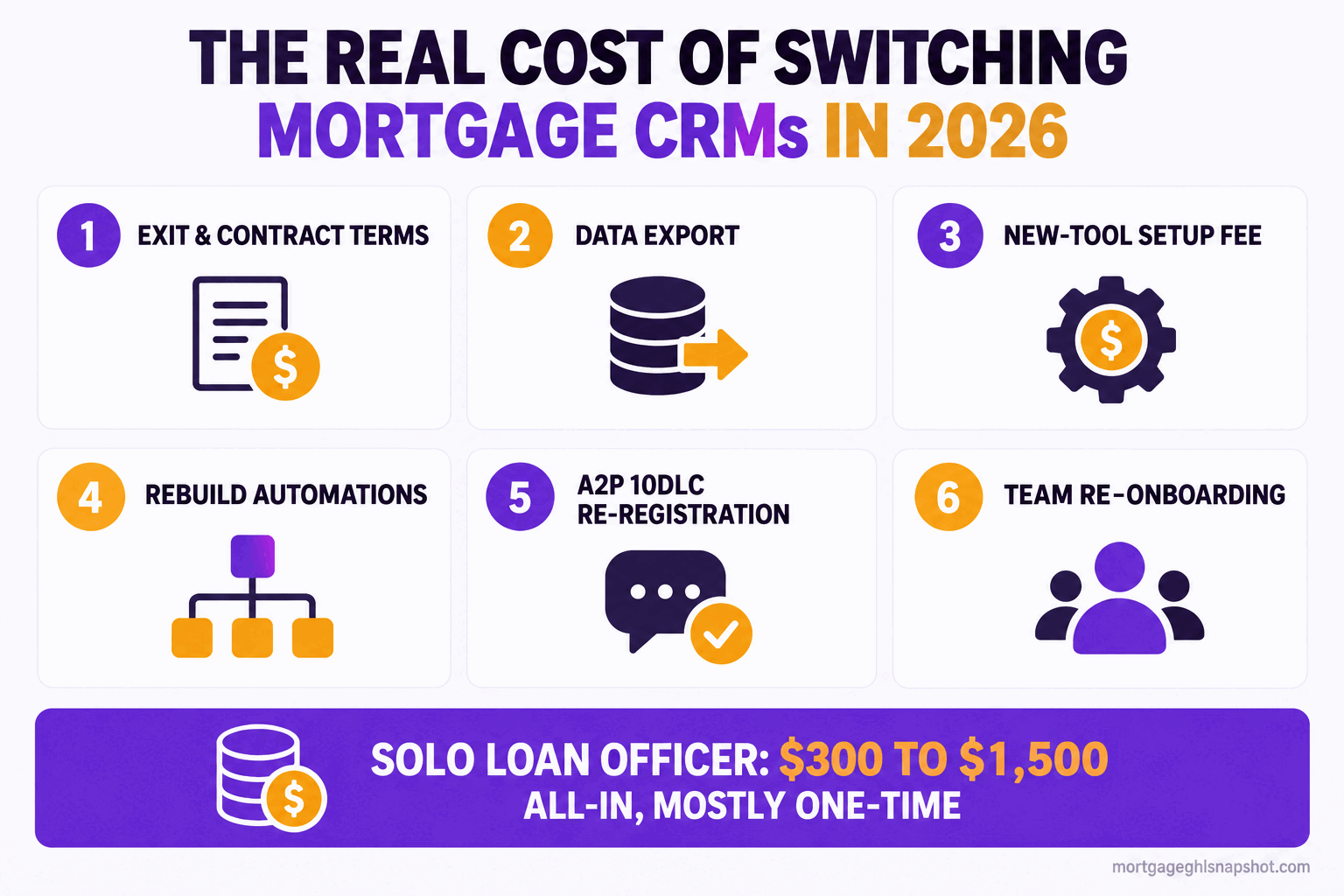
Here is the honest version. The cost to switch a mortgage CRM in 2026 is not one number. It is six: what your current vendor charges you to leave, getting your data out, the setup fee on the new tool, rebuilding your automations, re-registering your texting, and the week or two your team runs slower learning the new screens. For a solo loan officer that total usually lands between $300 and $1,500 all-in; for a small brokerage it can run a few thousand. Almost none of it is the scary part people warn you about, and most of it is a one-time cost you earn back fast if you are overpaying today.
This is the teardown: every real cost of switching, three scenarios by shop size, and the export email that gets your data back without a fight.
What it costs you to stay
Start with the cost nobody puts on a spreadsheet. A CRM you barely open is a total loss every month. If your tool runs $150 a month and your past-client follow-up has gone silent, that is $1,800 a year for a database going cold.
And the database is the asset. Repeat and referral business is still how this industry works: 88% of buyers purchased their home through a real estate agent or broker in the latest National Association of Realtors profile (NAR, 2025). Your next several loans sit in contacts you already own. A CRM that does not work them is costing you loans you never see leave.
So the real comparison is not “switching cost versus zero.” It is “a one-time switch versus another twelve months of paying for nothing.” Every cost below is smaller than a wasted year.
The six real costs of switching, line by line
Here is the whole bill, in the order the costs hit you.
1. The exit cost: contracts and renewal dates
This one surprises people, and it has nothing to do with technology. It is the paper you signed. Many mortgage CRMs bill annually or lock you into a minimum term, so “cancel anytime” is often “cancel at renewal.” Jungo lists a one-year minimum contract alongside its per-user pricing (Capterra, 2026). Demo-gated enterprise tools like Total Expert and ICE Surefire do not publish terms at all, so you learn the length, notice period, and auto-renew clause only when the contract lands in your inbox.
Where it breaks: you give notice and find you are locked in for nine more months, or that you missed a 60-day cancellation window and auto-renewed. Fix it first. Pull your agreement, find the renewal date and notice period, and set a reminder 75 days ahead. You switch on your schedule.
2. Getting your data out
Your contacts, notes, loan history, tags, and opt-in records are all yours, and all of it has to come with you. The catch: vendors make export easy in proportion to how much they want you to stay. Some give you a clean CSV in two clicks. Some bury it in a support ticket. A few charge a “data extraction” fee designed to make leaving feel expensive.
Where it breaks: you export contacts but forget the notes and consent timestamps, then discover weeks later that the story behind every relationship, and the proof you had permission to text them, stayed behind on a platform you no longer pay for. Export everything in full while your account is active. Never cancel first. A dead account is a locked filing cabinet.
3. The setup fee on the new tool
The one real up-front charge, and the published numbers are small. BNTouch lists an activation fee on third-party directories (around $99, though its own 2026 table shows setup as included) on top of a ~$165/month individual plan (BNTouch). Jungo publishes a $249 one-time setup fee for its Mortgage App plan (Capterra). Demo-gated enterprise platforms quote implementation fees in the thousands, unseen until the proposal.
Where it breaks: you forget the setup fee, or sign with an enterprise tool whose “onboarding package” costs more than a year of a purpose-built alternative. Get the number in dollars, in writing, before you commit.
4. Rebuilding your automations and templates
Your follow-up sequences, text templates, pipeline stages, and pre-approval nurture do not export. Workflows are specific to the platform that runs them, so moving CRMs means rebuilding the logic. For a solo LO with a few sequences, that is an afternoon. For a shop with deep automation, it is real project hours, and where a done-for-you system or a developer earns its fee.
Where it breaks: you move your contacts but not your process, and the new CRM becomes the same silent address book. The whole point of switching is the automation. Port the data, skip the workflows, and you paid the switch cost for nothing. Treat the rebuild as the main event.
5. Re-registering your texting (A2P 10DLC)
The technical cost most people miss. To send business texts in the US, your sending platform registers a 10DLC brand and campaign with the carriers, and that registration is tied to the platform. Move and you re-register, which means new fees and a vetting wait before texts flow again. Twilio’s schedule puts a standard brand at about $46 one-time, campaign vetting at $15, and a recurring monthly fee around $10 (Twilio, 2026); sole-proprietor brands are near $4.50. The dollars are minor. The timing is not.
Where it breaks: you cancel the old platform, start the new one, and your texting sits in vetting for days while speed-to-lead goes to zero. Stagger it. Register on the new platform before you shut the old one down, keep the old number live until the new campaign is approved, and carry your opt-in records across. Full rules in our mortgage text-message compliance guide.
6. Team re-onboarding and the productivity dip
The last cost is human. Every LO and assistant has to learn the new screens, and for a week or two they will be slower and ask you where the pipeline went. The dip is real, temporary, and proportional to headcount. A solo operator absorbs it in days. A fifteen-person shop needs a rollout plan and one person who learns it first and teaches the rest.
Where it breaks: you flip everyone over on one Monday with no training, deals stall mid-pipeline, and the team decides the new tool is worse before learning it. Phase it. Migrate, train a small group, run both systems in parallel for a short overlap, then cut over once people are comfortable.
One-time charges that hit on day one of a switch, USD. “10DLC re-reg” combines Twilio’s ~$46 brand and $15 campaign fees. “Enterprise onboarding” is an unverified low-end estimate for demo-gated platforms, which publish no number. Sources: BNTouch, Capterra (Jungo), Twilio, 2026.
The six on one screen:
| Cost | Who charges it | Typical amount | When it hits |
|---|---|---|---|
| Exit / contract | Current vendor | $0, or remaining term if locked | Before you leave |
| Data export | Current vendor | $0 to a few hundred | Before you cancel |
| New-tool setup | New vendor | $0 to $249 (SMB), thousands (enterprise) | Day one |
| Rebuild automations | You or a developer | Hours, or a build fee | Weeks 1–2 |
| 10DLC re-registration | Carriers | ~$61 standard, ~$4.50 sole prop | Weeks 1–2 |
| Team re-onboarding | Your time | 1–2 weeks of slower output | Weeks 1–3 |
Three switching scenarios: solo, small team, brokerage
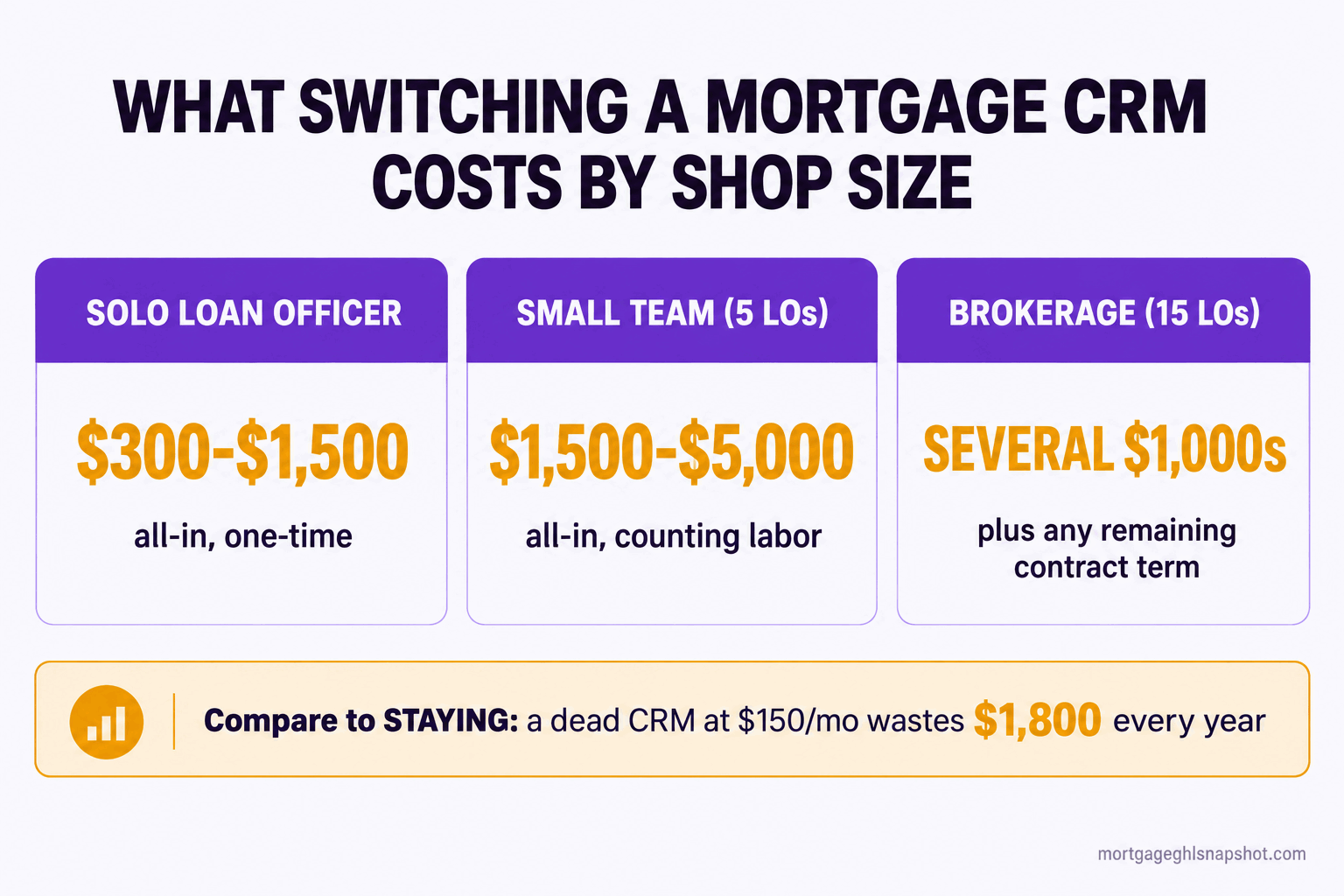
The total changes with shop size, and so does which costs dominate.
The solo loan officer
You are the only user, so the human cost is small and the data is light. Your switch is mostly a setup fee, a weekend of rebuilding a few sequences, and a 10DLC re-registration. If your current tool is month-to-month, your exit cost is zero. Realistic all-in: $300 to $1,500, almost all one-time, most of it your own hours if you rebuild yourself. Against a familiar-but-dead CRM at $150 a month, you break even inside a year. The solo case is where “migration is a nightmare” is simply false.
The small team (5 LOs)
The human cost grows. Five people learning new screens is a real dip, and you have more automation to port. Setup and 10DLC stay minor; the rebuild and re-onboarding are where the hours go, and if your vendor bills per user on an annual term, your exit cost is whatever is left on the contract. Realistic all-in: $1,500 to $5,000 counting labor. This is also the size where per-user pricing on the old tool quietly punishes you, so the switch often pays for itself in monthly savings alone.
The brokerage (15 LOs)
At fifteen seats the switch is a project, not a weekend. Data is large, automations are deep, and re-onboarding needs a phased rollout so the pipeline does not stall. Your exit cost can be significant mid-term on an enterprise or per-user annual contract. Realistic all-in: several thousand dollars in labor, plus any remaining term. But the monthly math is most lopsided here: a per-seat tool at $95 a user is $1,425 a month at fifteen seats, so a flat-priced platform erases the entire switch cost in a quarter or two.
Steal this: the data-export email and switch checklist
Two things keep a switch from going sideways: getting your data out cleanly, and doing the steps in the right order.
The consent records in item 4 are the part people forget, and they matter most: your permission to text a borrower is a legal record that does not exist in the new CRM unless you bring it.
Do these in order and the “nightmare” turns into a two-week project with no dark days. Skip steps 1, 5, or 7 and that is where the horror stories come from.
The compliance trap inside a migration
A switch touches the three rules that govern mortgage marketing, and a sloppy migration is where firms trip over all three at once.
TCPA and consent. Your right to text and email a borrower depends on documented consent. Export contacts but leave the opt-in records behind and you are messaging people you can no longer prove gave permission, with statutory TCPA damages running per message. Carry the consent timestamps across with the contacts.
The SAFE Act’s NMLS-ID rule. Your NMLS ID has to appear on your advertising, and a fresh CRM is a fresh set of templates. When you rebuild your sequences, the ID has to go back into every outbound template, because the new tool will happily send without it if you let it.
RESPA Section 8. If your automation co-markets with realtor partners, the rebuild is a chance to get it right. Paying for referrals is banned, and a lawful marketing-services arrangement requires payments “reasonably related to the value of services actually performed” (12 CFR 1024.14(g)), with no per-referral payments and no cost-splits scaled to lead volume. Build co-marketing workflows to that standard, not the old one. Our RESPA-safe realtor co-marketing guide walks through it.
No CRM makes you compliant, and a migration is the moment those guardrails are easiest to drop. Rebuild them on purpose.
Common objections, answered
“Isn’t migration just too much of a hassle?” For a solo LO, no. It is a setup fee and a weekend. The “nightmare” reputation comes from large shops that skipped the checklist, let texting go dark, or moved fifteen people on one Monday. Done in order, it is a two-week project, not a disaster, and the alternative is another year of paying for a tool you do not use.
“I already pay for Total Expert (or Surefire). Won’t I lose features?” Most small shops use a fraction of what an enterprise platform does while paying for all of it. List the features you actually touch in a week, then ask whether a flat-priced tool covers them. If it does, the “features” you would lose are ones you never used. For the sticker-price comparison, see what mortgage CRM software actually costs.
“Do I need to be technical to switch?” Less than you think. The rebuild is the part that benefits from help, which is what a done-for-you build or a GoHighLevel developer handles, so you land on a system where the follow-up and database reactivation run without you touching a keyboard. “Can I run it myself” matters less than “does it run itself.”
The bottom line before your next renewal
Go back to that renewal you almost clicked. The reason you stayed was a word, “nightmare,” not a number. Now you have the numbers. Switching a mortgage CRM is six one-time costs, most of them small, and the largest is your own time for a week or two. The cost of staying is paying every month for a database going cold. For a solo LO the switch is a few hundred dollars and a weekend. For a team it usually pays for itself in saved per-seat fees inside a quarter.
So do the one thing that makes it real: pull your contract today and find your renewal date. Then export your data, pick a tool that does not tax you per loan officer, and rebuild your follow-up the way it should have run all along. If you would rather skip the rebuild, the Mortgage Snapshot is a done-for-you GoHighLevel system installed in 24 hours, built on a platform whose plans (Starter $97, Unlimited $297) charge a flat rate instead of per seat. Disclosure: that GoHighLevel link is our affiliate link, and we earn a commission if you sign up, at no extra cost to you.
Frequently asked questions
How much does it cost to switch mortgage CRMs in 2026?
Six one-time costs: exit or contract terms, data export, the new tool's setup fee, rebuilding automations, re-registering A2P 10DLC, and team re-onboarding. For a solo loan officer the all-in total is usually $300 to $1,500, most of it your own time. A small team runs $1,500 to $5,000 counting labor, and a 15-person brokerage is a several-thousand-dollar project plus any remaining contract term.
Can I lose my data when I switch CRMs?
Only if you cancel before you export. Your contacts, notes, history, and consent records are yours. Request a full export in CSV or Excel while the account is active, confirm it opens cleanly, then import and spot-check a dozen contacts before you cancel. Data loss is almost always a sequencing mistake, not a technical one.
Will my text messaging keep working during a switch?
Not automatically. A2P 10DLC registration is tied to your sending platform, so moving means re-registering, which carries small fees (around $46 for a standard brand and $15 for campaign vetting per Twilio) and a vetting wait of several days. Register on the new platform and keep your old number live until the new campaign is approved, so outreach never goes dark.
Do mortgage CRMs lock you into a contract?
Some do. Jungo lists a one-year minimum contract, and demo-gated tools like Total Expert and ICE Surefire negotiate terms you only see when the contract arrives, often with annual billing and auto-renew. Find your renewal date and notice period before you shop, and set a reminder about 75 days ahead.
Does a new CRM handle TCPA and RESPA compliance for me?
No. A migration is where compliance is easiest to drop. You must carry consent records across to stay TCPA-safe, re-add your NMLS ID to every rebuilt template under the SAFE Act, and rebuild any realtor co-marketing to meet RESPA Section 8. The software holds the guardrails, but the legal responsibility is yours.