
Introduction
If you’ve been in the mortgage world for a while, you already know this: leads don’t wait.
They shop around, they compare rates, and they expect lightning-fast responses.
But between juggling pre-approvals, real estate partners, and a million daily tasks, it’s easy to miss follow-ups and that’s where deals die.
That’s why the GoHighLevel (GHL) snapshot is a total game-changer for mortgage professionals. It’s a complete, ready-to-use system that automates your communication, manages your leads, and helps you convert more clients effortlessly.
In this article, we’ll cover the 7 most powerful GHL snapshot features that can immediately boost your mortgage lead conversion rates and simplify your workflow.
Key Takeaways
- Contacting a lead within 5 minutes increases conversion chances by up to 100x.
- GHL snapshots automate your follow-ups, conversations, and pipelines.
- Built-in AI tools handle calls, chat, and appointments 24/7.
- Mortgage-specific workflows keep pre-approvals, docs, and rate locks on track.
- Brokers using GHL snapshots report recovering 5–10 lost consultations per week.
Why Most Mortgage Leads Slip Away
According to industry studies, the average mortgage lead conversion rate sits between 2%–5%. That means 95%+ of leads never close. Why?
- Leads aren’t contacted fast enough.
- Follow-ups are inconsistent.
- Teams lose track of pipeline stages.
- Prospects drop off before sending documents.
A Harvard Business Review study found that if you follow up with a lead within five minutes, you’re 100 times more likely to make contact than if you wait 30 minutes.
That’s why automation isn’t just convenient it’s essential. And this is exactly where a GHL snapshot shines.
What Is a GHL Snapshot?
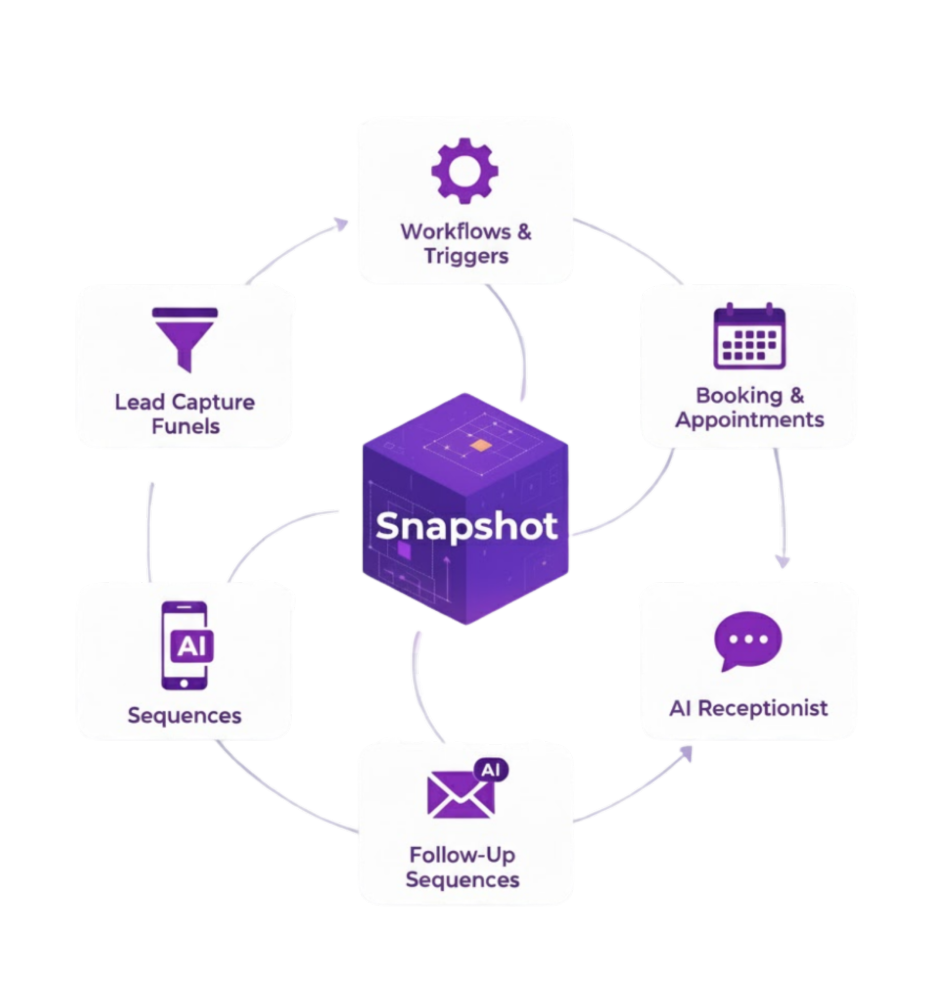
A snapshot in GoHighLevel is essentially a template or “blueprint” of a sub-account setup. It packages assets like funnels, workflows, triggers, pipelines, calendars, templates, and more so you can deploy or clone it to other accounts quickly For mortgage brokers, a mortgage snapshot can come prebuilt with:
- Mortgage-specific lead capture funnels (purchase, refinance)
- Preapproval & application workflows
- SMS / email drip sequences
- Pipelines tracking each application stage
- AI receptionist / chat flows
- Document reminders, rate lock notifications, and more
Once configured, the snapshot becomes the system backbone ensuring consistency, faster deployment, and scalable processes.
7 GHL Snapshot Features That Skyrocket Mortgage Lead Conversion
Instant Multi-Channel Follow-Up
Every second counts when a new lead comes in. Instead of manually calling or texting back, your snapshot automatically replies within seconds through SMS, email, or even voicemail drops.
Example:
A new lead fills out your form. Within 3 seconds, they receive:
- A friendly text: “Hey Sarah! Thanks for reaching out. When’s a good time to talk about your home loan goals?”
- A personalized email confirming their request.
- A voicemail drop introducing your services.
This triple-touch approach creates instant engagement and positions you as the responsive expert before your competitors even pick up the phone.
24/7 AI Receptionist & Voice Bot
- Greets callers professionally
- Qualifies purchase, refinance, or HELOC leads
- Transfers calls to you or a team member when available
- Uses proven call scripts to sound human and helpful

Ready to bring your 24/7 Mortgage Chatbot to life?
Get the Mortgage Snapshot today and start closing more loans.
Automated Workflows That Keep Your Pipeline Moving
Your GHL snapshot comes preloaded with smart workflows that handle all the repetitive follow-ups you used to do manually:
- Pre-qualification reminders
- Rate lock and expiration alerts
- Document collection reminders
- Application follow-up sequences
Smart CRM Pipelines and Automated Reminders
Your CRM is the heartbeat of your mortgage business. With your snapshot, you get visual pipelines that show exactly where each client stands from first contact to closing.
Typical stages include:
- New Lead
- Consultation Booked
- Pre-Approval Started
- Documents Received
- Loan in Processing
- Closed
Each stage triggers its own automation: status updates, reminders, or review requests all handled automatically.
Review & Referral Automation
Once a loan closes, the automation keeps working for you. Your snapshot automatically sends:
- ⭐ A Google Review request
- 💬 A thank-you text
- 💼 A referral invitation message

How the GHL Snapshot Boosts Mortgage Lead Conversion
The GHL snapshot helps mortgage brokers turn leads into clients faster by automating everything from the first hello to the final closing. The moment a new lead comes in, it instantly sends a friendly text, email, or voicemail — keeping you top-of-mind before competitors even respond.
Your 24/7 AI receptionist and chatbot then step in to answer questions, qualify borrowers, and book consultations while you focus on deals that matter most. Behind the scenes, smart workflows send reminders for pre-approvals, rate locks, and document uploads so no lead slips away.
A visual CRM pipeline tracks every stage, giving you total clarity, while automated thank-you messages and review requests turn happy clients into loyal promoters.
Simply put, the GHL snapshot works like a digital assistant that never sleeps following up instantly, staying organized, and helping you close more loans with less effort.
Best Practices & Tips
- Test before launching simulate leads and run through all flows
- Personalize where possible: merge tags (first name, loan amount) increase engagement
- Monitor metrics: track open rates, click-throughs, pipeline drop-off
- Update snapshot periodically: push changes to live accounts via snapshot updates HighLevel Support Portal+1
- Segment leads: e.g. purchase vs refinance may need different messaging
- Provide fallback to human : if automation fails, transfer to a real rep

Try It Out Risk‑Free
From lead capture to loan closing, the Mortgage Snapshot handles it all.
Frequently Asked Questions
What exactly is a GHL snapshot?
A GHL (GoHighLevel) snapshot is a template or copy of a sub-account’s assets—funnels, workflows, triggers, calendars, etc. HighLevel Support It allows you to deploy or replicate a full setup to new accounts or update existing ones.
Do I need to be a GHL agency to use a snapshot?
Can I edit or customize the snapshot after import?
How often should I refresh/update my snapshot?
Is it worth it for small mortgage teams?
How much lift can I expect?
How do I train the AI receptionist/chatbot for mortgages?
Conclusion
Close More Loans with the Mortgage Snapshot
Stop losing leads to slow follow-ups. Let the Mortgage Snapshot handle it for you.